This is default featured slide 1 title

Go to Blogger edit html and find these sentences.Now replace these sentences with your own descriptions.This theme is Bloggerized by Lasantha Bandara - Premiumbloggertemplates.com.

This is default featured slide 2 title

Go to Blogger edit html and find these sentences.Now replace these sentences with your own descriptions.This theme is Bloggerized by Lasantha Bandara - Premiumbloggertemplates.com.

This is default featured slide 3 title

Go to Blogger edit html and find these sentences.Now replace these sentences with your own descriptions.This theme is Bloggerized by Lasantha Bandara - Premiumbloggertemplates.com.

This is default featured slide 4 title

Go to Blogger edit html and find these sentences.Now replace these sentences with your own descriptions.This theme is Bloggerized by Lasantha Bandara - Premiumbloggertemplates.com.

This is default featured slide 5 title

Go to Blogger edit html and find these sentences.Now replace these sentences with your own descriptions.This theme is Bloggerized by Lasantha Bandara - Premiumbloggertemplates.com.

Blogger Tricks

Tampilkan postingan dengan label Office tool. Tampilkan semua postingan

Rabu, 21 Maret 2012

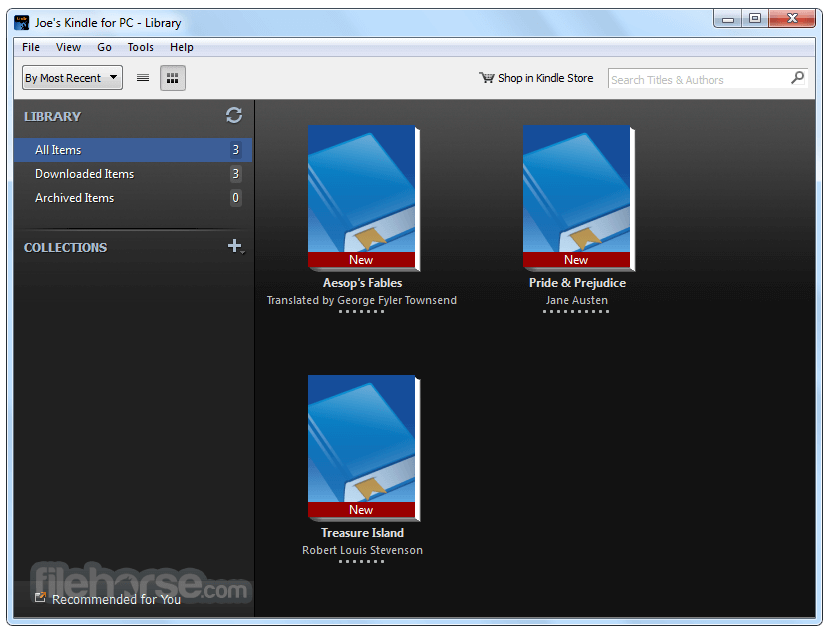
Kindle for PC 1.9.2 Build 38420


Kindle for PC is a free application that lets you read Kindle books on your PC.
Read Kindle Books on Your Computer
  • Get the best reading experience available on your PC. No Kindle required.
  • Access your Kindle books even if you don't have your Kindle with you.
  • Automatically synchronizes your last page read and annotations between devices with Whispersync.
  • Create bookmarks and view the annotations you created on your Kindle.
Download

Selasa, 13 Maret 2012

LibreOffice 3.5.1 RC 2


LibreOffice is the free power-packed Open Source personal productivity suite for Windows, Macintosh and Linux, that gives you six feature-rich applications for all your document production and data processing needs.
Writer is the word processor inside LibreOffice. Use it for everything, from dashing off a quick letter to producing an entire book with tables of contents, embedded illustrations, bibliographies and diagrams.
Calc tames your numbers and helps with difficult decisions when you're weighing the alternatives.
Impress is the fastest and easiest way to create effective multimedia presentations.
Draw lets you build diagrams and sketches from scratch. A picture is worth a thousand words, so why not try something simple with box and line diagrams?
Base is the database front-end of the LibreOffice suite.
Math is a simple equation editor that lets you lay-out and display your mathematical, chemical, electrical or scientific equations quickly in standard written notation.

Download

PDFCreator 1.3.0


PDFCreator is a free tool to create PDF files from nearly any Windows application.
Key Features:


  • Create PDFs from any program that is able to print
  • Security: Encrypt PDFs and protect them from being opened, printed etc.
  • Send generated files via eMail
  • Create more than just PDFs: PNG, JPG, TIFF, BMP, PCX, PS, EPS
  • AutoSave files to folders and filenames based on Tags like Username, Computername, Date, Time etc.
  • Merge multiple files into one PDF
  • Easy Install: Just say what you want and everything is installed
  • Terminal Server: PDFCreator also runs on Terminal Servers without problems
And the best: PDFCreator is free, even for commercial use! It is Open Source and released under the Terms of the GNU General Public License.
 

Wondershare PDF Converter 3.1.0.4


Wondershare PDF Converter - a professional solution for converting PDF files into Microsoft Word, Microsoft Excel, Microsoft PowerPoint, HTML, EPUB, text documents, and commonly used image formats. Just with a few clicks, you can convert PDF-files in the target format with amazing skorostyu.Ishodny appearance of text, images, and hyperlinks can be exactly stored in the generated Word, PowerPoint and HTML documents. With Wondershare PDF Converter, you can import about 200 PDF-files for a batch conversion, or select a specific range of pages.

Wondershare PDF Converter can convert normal PDF to Word, Excel, PowerPoint, EPUB, HTML, Text and commonly used images with high quality on Windows 7/XP/Vista/2003 platforms. It performs quite quickly and efficiently which can save you a lot of time and money while dealing with native PDF files. Handling PDF tasks has never been so easy with Wondershare PDF Converter.

Features:
• Convert PDF files into editable Microsoft Word 2002-2010 format (. DOC,. DOCX)
- Retain the original text content, images, and format
• Convert PDF files into editable Microsoft Excel 2003/2007/2010 (. Xls,. Xlsx)
• Convert PDF files into Microsoft PowerPoint 2002-2010 format (. PPT,. PPTX)
- Retain the original format, layout images
• Convert PDF files to HTML (. HTML)
- Retain the original layout, format, and hyperlinks
- Support for most popular browsers, like IE, Firefox, Safari and Opera.
- Ability to determine the quality of images in the exported HTML files
• Convert PDF files into text format (. TXT)
- Extract all text content from PDF files
• Convert PDF files to EPUB
• Standard version also supports to convert PDF to images (. PNG,. JPG,. GIF,. BMP,. TIFF)
- Accurately preserve the original text, images, graphics, hyperlinks.
- Support for setting the font size, background color and text.

You can read e-books Epub on:
- Apple iPad (using Apple iBooks)
- IPhone and iPod Touch (using Lexcycle Stanza, Glider)
- Sony Reader
- Barnes & Noble nook
- Hanlin eReader
- COOL-ER
- ESlick
- Bookeen Cybook Gen3, Cybook Opus
- IRex Digital Reader 1000
- IRex Digital Reader 800
- Phones / devices using Android
- PocketBook Reader
- Ctaindia's eGriver Ebook Reader

• Support format PDF 1,0-1,7
• Convert the whole PDF document or only a specific range of pages (all from - to, individual pages).
• Batch mode conversion.
• Wondershare PDF Converter can also convert encrypted PDF files that are protected from printing, editing and copying.
• For PDF files with password for opening, you must enter the password in a popup window, and then start the conversion.
• Pleasant and easy to use interface.

Key Features
• PDF Converter can convert PDF to Word, Excel, PowerPoint, EPUB, HTML, and Text with all the original text content, layouts, tables, images and even hyperlinks well preserved after conversion. The standard version also supports converting PDF to images (. Png,. Jpg,. Gif,. Bmp,. Tiff)
• It provides advanced options for you to customize the output Excel spreadsheets, EPUB files, HTML pages and output format for images flexibly and efficiently.
• Batch conversion mode: allows you to convert up to 200 PDF files to multiple document formats at one time, which can highly improve your working efficiency.
• Partial conversion mode: allows you to select specific pages or page ranges (eg: 1, 3, 6-8) from multi-page PDF files to convert. This mode can help you extract the useful info from large PDF files instantly.
• PDF Converter allows you to convert PDF files with copying and printing restrictions directly, without knowing the password.
• If the PDF file is protected with open password, you need to have the authorized password to convert the file with PDF Converter.
• Extremely easy to use, converts PDF files with three simple steps: Import-Customize - Convert
• User-friendly and intuitive interface
• Support PDF files in 12 languages: English, Turkish, Thai, Latin, Korean, Greek, Cyrillic, Japanese, Chinese, German, French, and Italian
• Standalone, doesn't need Adobe Reader, Adobe Acrobat, and Microsoft Office to be installed
• Support Microsoft Office 2010/2007/2003

Selasa, 06 Maret 2012

Sumatra PDF 2.0.5717

Sumatra PDF - easy image viewer PDF, DjVu, XPS, CBR, CBZ-files. The program works fast, has a very simple design, does not load the system can be run from external USB-card. The minimalist design of the program is more than compensated by its very brisk work that distinguishes Sumatra PDF from the same Adobe Reader. This version improves handling of documents added to the settings dialog, improved handling of Unicode, added the ability to not record the history of viewed files, improved support for SyncTeX, introduced a new icon for the PDF-files, and bug fixes. The main priority and the benefit of the program is its simplicity and high performance. It remains to add that in addition to other advantages of Sumatra PDF is also completely free and distributed, including, and based on open source.
 The portable version runs without installation on your computer

Key features:
• view files in PDF, DjVu, XPS, CBR, CBZ, CHM
• simple design
• High speed.

Download
Source

Selasa, 21 Februari 2012

PDFZilla 1.2.9 Standard


PDFZilla is an application that converts PDF files into editable MS Word, documents of Rich Text, Text Files, Images, HTML Files, and Shockwave Flash SWF Files. PDFZilla supports all popular formats: DOC, RTF, TXT, BMP, JPG, GIF, PNG, TIF, HTML, SWF.

Download the distribution and get the key itself .
Below is a ready-made kit.

Released: 2012
Size: 5.8 MB

Download: