This is default featured slide 1 title

Go to Blogger edit html and find these sentences.Now replace these sentences with your own descriptions.This theme is Bloggerized by Lasantha Bandara - Premiumbloggertemplates.com.

This is default featured slide 2 title

Go to Blogger edit html and find these sentences.Now replace these sentences with your own descriptions.This theme is Bloggerized by Lasantha Bandara - Premiumbloggertemplates.com.

This is default featured slide 3 title

Go to Blogger edit html and find these sentences.Now replace these sentences with your own descriptions.This theme is Bloggerized by Lasantha Bandara - Premiumbloggertemplates.com.

This is default featured slide 4 title

Go to Blogger edit html and find these sentences.Now replace these sentences with your own descriptions.This theme is Bloggerized by Lasantha Bandara - Premiumbloggertemplates.com.

This is default featured slide 5 title

Go to Blogger edit html and find these sentences.Now replace these sentences with your own descriptions.This theme is Bloggerized by Lasantha Bandara - Premiumbloggertemplates.com.

Blogger Tricks

Kamis, 01 Desember 2011

Blue Screen Pada Saat menginstal

Ini adalah pengalaman saya ketika menginstall ulang laptop kawan saya yang terkena virus. Sebelumnya, windows XP di laptopnya sudah terformat, tapi gagal di install karena CD ROM nya yang lambat membaca CD.Ketika saya hendak menginstall ulang lagi laptop kawan saya, saat proses loading file-file setup windows tiba-tiba muncul blue screen.


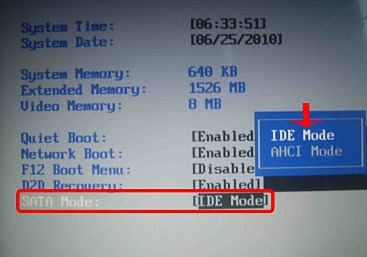
Saya belum tahu penyebabnya yang sebenarnya. Saya coba lagi sampai 3 kali, tetap saja seperti itu. Akhirnya, saya cari-cari jawabannya di google dan saya menemukan solusinya. Dan solusinya ada pada BIOS.


Masuk ke BIOS pada saat komputer dihidupkan dengan menekan F2 atau F10 (tergantung BIOS komputernya). Cari tulisan SATA Mode dan ubah nilainya dari AHCI ke IDE. Kemudian simpan dan keluar.
Terakhir install kan lagi windows XP Anda dan mudah-mudahan sudah tidak ada lagi masalah.

NTLDR IS MISSING

Kadang kita menemui komputer Windows XP kita tidak bisa booting lagi dan muncul pesan error “NTLDR is Missing“. Hal ini terjadi karena hilang atau corrupt-nya file-file berikut :
  • NTLDR
  • Ntdetect.com
  • boot.ini
Untuk mengatasi error “NTLDR is Missing” ini bisa dilakukan dengan panduan yang diberikan oleh pihak Microsoft. Cara ini telah saya coba sendiri dan terbukti, panduannya silahkan diterjemahkan sendiri OK !
Microsoft : Generally there are 2 methods to resolve this NTLDR issue.
A. Manual File Re-Patching
This method attempts to copy and replace the corrupted file from the Windows Installation disc to your hard disk. To start, follow these steps:
1. Insert the Windows XP CD into your computer as default boot up media.
2. Enter Windows Recovery Console
3. At the command prompt, assuming drive D refers to your CD Drive, type in the following and hit Enter:
Press Y when prompted to overwrite any existing file.
* copy D:\i386\ntldr C:\
* copy D:\i386\ntdetect.com C:\
4. Restart the computer
If the error message still persist, it is likely that your boot.ini file is corrupted. Try to fix your corrupted boot.ini file instead. Follow the next step.
B. Manually Editing the Boot.ini File
1. Boot from your Windows XP CD in your computer
2. Enter Windows Recovery Console
3. Type in: type c:\Boot.ini
This command checks for a valid Boot.ini file. If your boot file is working fine, you should see like the following:
[boot loader]
timeout=30
default=multi(0)disk(0)rdisk(0)partition(1)\WINDOWS
[operating systems]
multi(0)disk(0)rdisk(0)partition(1)\WINDOWS=”Microsoft Windows XP Professional” /fastdetect
4. If you receive the following error messages instead of the above message being displayed, your boot.ini file is corrupted or missing:
* The system cannot find the file or directory specified
* File not found – boot.ini

5. To write a new boot.ini file, follow these steps:
* Type in: edit.com
The MS-DOS editor will launch.
* Type in the following and save it as a boot.ini
[boot loader]
timeout=30
default=multi(0)disk(0)rdisk(0)partition(1)\WINDOWS
[operating systems]
multi(0)disk(0)rdisk(0)partition(1)\WINDOWS=”Microsoft Windows XP Professional” /fastdetect
IMPORTANT: partition(1) refers to your first partition of your hard disk which Windows is typically installed on. You may need to change the value if Windows is installed in a different partition.
6. Reboot your computer and the problem should be resolved.

Private Firewall

Privatefirewall is a Personal Firewall and Intrusion Detection Application that helps prevent unauthorized access to your PC, at home, the office, or on the road. Privatefirewall constantly monitors the sensitive areas of a PC where intrusion can occure, including browser security settings, network settings etc. and reports on their status. The program is easy to install/use and provides protection right “out of the box”.
The interface will accommodate advanced users as well as novice users, it does not overload you with options and features, yet provides access to powerful rule settings and filers for advanced users via the right click menu. Privatefirewall offers everything that you`d expect from a personal firewall, including Packet Filtering, Internet traffic (packet) filtering, port scanning, IP tracking, SecurePOP email protection, and a proprietary Application Control Engine, which monitors all applications that access the Internet.
The program integrates with the Windows Security Center, and offers a choice of 3 different profile settings for at home, at work and on the road, which makes it especially interesting for Notebook users that frequently connect to other networks.
Features:
  • Zero-hour anti-virus protection
  • Zero-hour spyware protection
  • Zero-hour malware protection
  • Behavioral hacker protection
  • Personal Firewall
  • Website/IP filtering
  • Advanced Application Security
  • Basic Application Security
  • Process Security
  • Registry protection
  • System Anomaly Detection
  • Email Anomaly Detection
System Requirements:

PCMAV 6.1 + WINDOWS 8

PC Media 11/2011Telah hadir edisi terbaru Majalah PC Media 11/2011 dengan Super DVD 8 GB, yang menyertakan juga antivirus terbaru kebanggaan Indonesia, PCMAV 6.1 Asgard. Saat ini, PCMAV merupakan satu-satunya antivirus yang mampu mengenali 4.860 virus dan variannya yang dilaporkan banyak menyebar di Indonesia.
Segera dapatkan PCMAV 6.1 Asgard terbaru yang telah disempurnakan hanya dari majalah PC Media 11/2011 yang telah terbit. Segera pesan dan dapatkan di kios/agen terdekat.
Pertanyaan teknis harap disampaikan langsung ke redaksi PC Media melalui e-mail dengan sebelumnya Anda telah membaca dan memahami isi README.TXT. Dan kami akan berterimakasih jika Anda dapat meluangkan waktu untuk memberikan komentar sebatas penggunaan PCMAV 6.1 ini sebagai masukan dalam pengembangannya.

APA YANG BARU?/CHANGE-LOG

  • ADDED! Removal engine khusus untuk membersihkan secara tuntas virus Bengal, None, Craft3, TODO, dan PenDrive yang menyebar luas di Indonesia.
  • UPDATED! Ditambahkan database pengenal dan pembersih 149 virus lokal/asing/varian baru yang dilaporkan menyebar di Indonesia. Total 4860 virus beserta variannya.
  • ADDED! Penambahan 2 extension baru yaitu MD5 Checker dan Virtual Keyboard.
  • ADDED! Penambahan menu “Show file location” pada daftar virus yang terdeteksi.
  • ADDED! Penambahan parameter “/NOUPDCLAM” untuk menghindari pengecekan update ClamAV.
  • FIXED! Perbaikan Extension Manager agar tidak error saat ditutup ketika ada ekstension yang masih aktif.
  • FIXED! Perbaikan file library yang menyebabkan program-program tidak berjalan baik pada beberapa komputer.
  • IMPROVED! Perubahan nama virus mengikuti varian baru yang ditemukan.
  • IMPROVED! Perbaikan beberapa minor bug dan improvisasi kode internal untuk memastikan bahwa PCMAV tetap menjadi antivirus kebanggaan Indonesia.
ARTIKEL MALWARE & REVERSE CODE ENGINEERING
Pada majalah PC Media 11/2011 ini, Anda dapat membaca artikel menyangkut Malware & Reverse Code Engineering (RCE):
Kebangkitan Malware Pencuri Data.
Tingginya pengguna situs jejaring sosial dimanfaatkan oleh berbagai malware untuk menyebar dengan cepat. Motifnya pun sudah mengarah pada cyber criminal seperti pencurian data atau mengendalikan komputer korban. Artikel ini mengungkap beberapa malware pencuri data yang menyebar dan teknologi yang menyertainya.

Download PCMAV 6.1

Rabu, 09 November 2011

PERBEDAAN USB 2.0 DENGAN 3.0

Hampir setiap orang tentu mengenal dan menggunakan Universal Serial Bus atau lebih dikenal dengan sebutan USB. Definisi USB sendiri adalah cara komunikasi antara peralatan dengan Host Controller(biasanya PC).

Mengenal Perbedaan USB 2.0 dengan USB 3.0 Image
USB ini sering dijumpai pada printer, komputer, scanner, handphone, mouse, kamera digital, flash drive, dsb. Sebelum ada USB, lebih dulu dikenal port serial dan parallel. Namun untuk saat ini, port USB telah menjadi port komunikasi yang standar.
USB 2.0
Teknologi USB 2.0 dikenalkan pada sekitar April 2000. Untuk kecepatan transfer(transfer rate), USB 2.0 bisa mencapai maksimal 480 Mbit/detik. Namun pada prakteknya, jarang sekali kecepatan USB 2.0 bisa sampai di atas 300 Mbit/detik. Selain itu, USB 2.0 memerlukan suplai maksimal daya sebesar 500mA. Sedangkan untuk pin steker pada USB 2.0 berjumlah 4 buah.
Mengenal Perbedaan USB 2.0 dengan USB 3.0 ImageTipe-tipe port USB
USB 3.0
Berbeda dengan USB 2.0, teknologi USB 3.0 diperkenalkan sejak tahun 2007. Keunggulan yang diusung oleh USB 3.0 bila dibandingkan USB 2.0 adalah kecepatan transfer datanya(transfer rate) yang mampu mencapai 5 Gbit/detik. Wow, hampir 10x lipat USB 2.0 kan? Perbedaan lain adalah permasalahan panjang kabel data. Jika pada USB 2.0, Anda disarankan manambah panjang kabel dengan maksimal 3 M untuk menjaga kecepatan transfer data tetap akurat. Di USB 3.0, panjang kabel bukan lagi faktor yang mempengaruhi kecepatan transfer data. Selain itu, USB 2.0 memerlukan suplai maksimal daya sebesar 900 mA.
Mengenal Perbedaan USB 2.0 dengan USB 3.0 Image
Kelebihan lain USB 3.0 dibandingan dengan USB 2.0 adalah sifatnya yang full duplex, artinya bahwa USB host dapat melakukan send and receive data secara terus menerus. Sedangkan untuk pin steker, USB 3.0 memiliki pin berjumlah 5 buah.
Kelemahan USB 3.0
Salah satu kekurangan USB 3.0 adalah belum ada dukungan dari sistem operasi. Sementara ini, Anda harus meng­install driver tambahan dari vendor tersebut agar bisa mendukung teknologi USB 3.0. Selain itu, baru sedikit perangkat keras (hardware) yang sudah mensupport USB 3.0. Oleh karena itu, hanya sedikit diantara banyak orang yang telah mencicipi teknologi USB 3.0 ini.
Dari paparan diatas, dapat disimpulkan bahwa perbedaan yang cukup mencolok antara USB 2.0 dengan USB 3.0 adalah tingkat kecepatan pengiriman data, yakni 400 Mbit/detik untuk USB 2.0 dan 5 Gbit/detik untuk USB 3.0.
thanks to ANANG S'OFT